Annual leave management software keeps track of employee vacation days, simplifies time off requests and approvals, and helps you stay compliant with labor regulations. It replaces spreadsheets, paper forms, and email threads with one system where employees request leave, managers approve it, and balances update automatically.
The right tool depends on your team size, your budget, and whether you need a focused annual leave tracker or something packaged inside a larger HR system. We compared 10 of the best annual leave management software tools on the market in 2026, with current pricing and a breakdown of what each one does best.
What is annual leave management software?
Annual leave management software automates the process of requesting, approving, tracking, and reporting on employee time off. Employees submit requests online or from a mobile app, managers approve or decline in a click, and the system keeps every balance accurate and visible to everyone who needs it.
Most tools cover all leave types: vacation, sick days, parental leave, unpaid leave, and any custom categories your organization uses. The better ones calculate holiday entitlement automatically, flag overlapping requests, and give managers a real-time view of who is available on any given day.
Some tools do one thing: track leave. Others include leave as one module inside a full HR platform with payroll, onboarding, and performance reviews. Which type you need depends on whether leave is your only gap or one of several.
Why teams move off spreadsheets
Manual tracking breaks down as you grow. A shared spreadsheet works for a handful of people. Once requests come in faster than someone can update the file, balances drift out of date and two people book the same week off without anyone noticing.
Compliance gets risky. Employment law in most countries requires accurate records of leave taken, accrued, and remaining. In the US, FMLA tracking adds another layer. In the UK and EU, statutory holiday entitlements must be calculated correctly for part-time and variable-hours staff. Dedicated software enforces your policy rules automatically and produces audit-ready records on demand.
Remote and hybrid teams need shared visibility. When people work across locations, a cloud-based system tells every manager who is off and who is available, wherever they are based. When nobody is in the same building to notice an empty desk, that shared calendar is the only way a manager knows who is actually around.
Payroll depends on clean leave data. When your leave system feeds accurate records to payroll, you remove a whole category of costly corrections at the end of each pay period.
Key features to look for
Before you commit to a tool, check that it covers the essentials:
- Request and approval workflow with instant notifications and one-click approvals so requests never sit in someone’s inbox for days.
- Custom leave types with individual rules for vacation, sick leave, parental leave, TOIL, and any category your policy requires.
- Automatic balance and entitlement calculations, including carryover rules, pro-rata for part-time staff, and accrual schedules that match your policy year.
- Overlap and coverage controls that prevent too many people on the same team from being off at once.
- Calendar integrations with Google Calendar, Outlook, and the chat tools your team already uses so approved leave shows up where people actually check schedules.
- Reporting that is filterable by employee, team, and leave type, and exportable for payroll processing.
- Mobile access so employees and managers can request and approve from their phones without logging into a desktop application.
How we evaluated these tools
We looked at tools where annual leave management is either the main product or a standalone module you can use without buying the full HR suite. For each one, we checked leave management depth (custom types, accrual automation, carryover, compliance), how easy it is for employees and managers to request and approve leave, what integrations it supports (calendars, Slack, Teams), whether it has a mobile app, and how transparent the pricing is. We also noted which team sizes and regions each tool fits best.
All pricing was verified on each vendor’s website as of September 2026. Vendors change prices, so confirm current rates before purchasing.
Best annual leave management software
Here are 10 of the best annual leave management tools, covering a range of team sizes and budgets. The table below summarizes each tool’s core capabilities. Detailed reviews follow.
| Tool | Free plan | Auto accrual | Mobile app | Calendar sync | Slack | Starting price |
|---|---|---|---|---|---|---|
| actiPLANS | ✔ | ✔ | ✔ | ✔ | — | Free up to 3 users; $1.50/user/mo |
| WhosOff | — | — | ✔ | ✔ | ✔ | From £0.95/user/mo |
| Timetastic | — | ✔ | ✔ | ✔ | ✔ | £1.20/user/mo |
| TimeTac | — | ✔ | ✔ | ✔ | — | €19.50/mo base + ~€2.50/user |
| Deputy | — | ✔ | ✔ | ✔ | — | From $5/user/mo |
| Myhrtoolkit | — | — | ✔ | ✔ | — | From £22/mo (banded) |
| Kenjo | — | — | ✔ | ✔ | ✔ | From €6/employee/mo |
| LeaveWizard | — | ✔ | ✔ | ✔ | ✔ | From £0.43/employee/mo |
| BrightHR | — | — | ✔ | ✔ | — | Quote (from ~£3/employee/mo) |
| ClayHR | — | ✔ | ✔ | ✔ | — | From $7/employee/mo |
1. actiPLANS
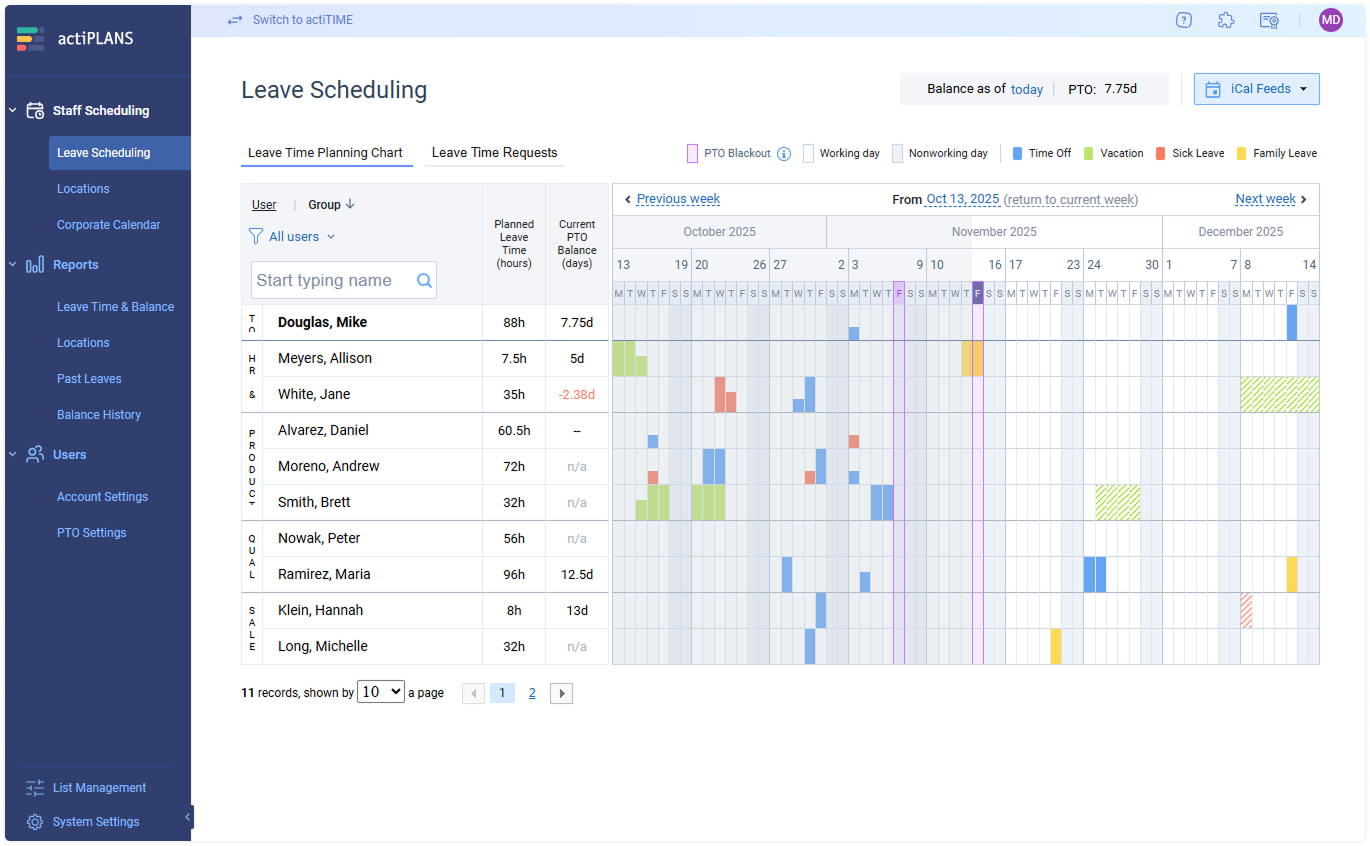
actiPLANS is a dedicated annual leave system with automated PTO calculations and a visual timeline that shows the entire team’s availability at a glance. Employees can plan leave for the year ahead by clicking dates directly on the timeline, and managers see immediately who is off, who is available, and where coverage gaps might appear.
The tool supports unlimited custom leave types, each with its own accrual rules, balance caps, and approval workflows. Managers can set up auto-approval for specific leave types, bulk-approve pending requests, and use PTO blackout dates to block requests during critical business periods. Balance calculations run automatically on configurable schedules (weekly, bi-weekly, monthly, or custom), and the system tracks full balance history so every adjustment is auditable.
actiPLANS also includes detailed reports that break down absence trends by team, leave type, and time period, with CSV and PDF export for payroll use. The mobile app lets employees submit requests, check balances, and see who is off from their phone. For teams that already use actiTIME for time tracking, the two products integrate so absence data and project hours live in one stack.
Pricing: Free plan for up to 3 users. Standard is $1.50 per user per month (billed annually). Growth is $1.20 per user per month for teams of 41 to 200 users. Enterprise is $270 per month for unlimited users. A 30-day free trial includes every feature.
Best for: Teams of any size that want a dedicated, configurable annual leave tracker rather than a module inside an HR suite. Especially strong for organizations with multiple locations, complex accrual policies, or teams that already use actiTIME for time tracking.
2. WhosOff
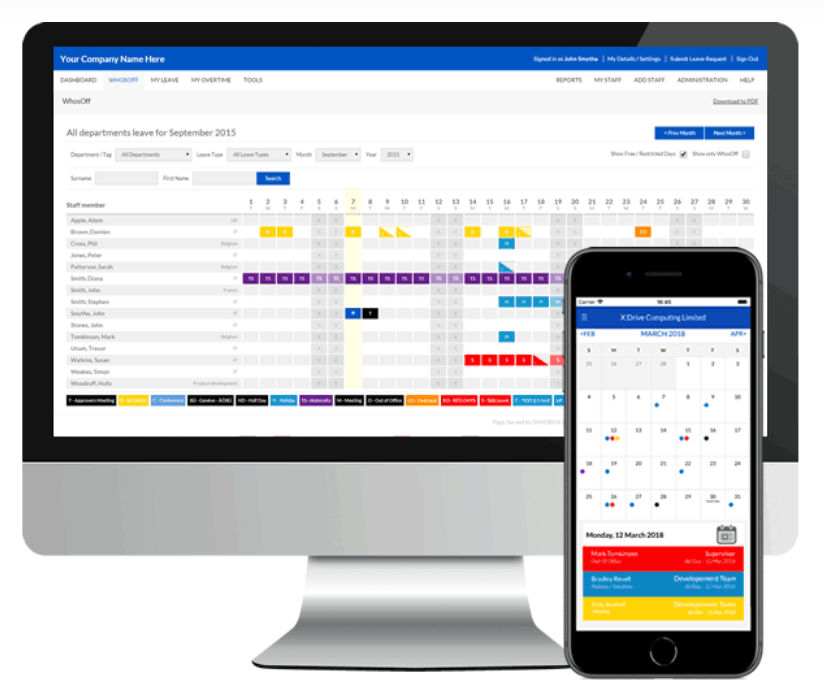
WhosOff is a clean, user-friendly staff leave planner used by over 2,500 organizations. It auto-calculates leave balances, shows who is off and when, and lets employees request and managers approve time off in a few clicks.
You can set custom time off policies, limit how many days each person takes, and restrict overlapping requests to prevent understaffing. WhosOff also handles TOIL and overtime, stores personnel documents in its Staff Hub, and connects to Microsoft Teams, Slack, and Google Calendar. The ability to restrict simultaneous absences per department is useful for operations teams that need minimum coverage levels at all times.
Pricing: From £0.95 per user per month, billable in GBP, USD, or EUR, with volume discounts as you add staff. Free trial of up to 8 weeks, no credit card required.
Best for: Small and medium-sized businesses that want simple, transparent per-user leave tracking backed by responsive UK-based support.
3. Timetastic
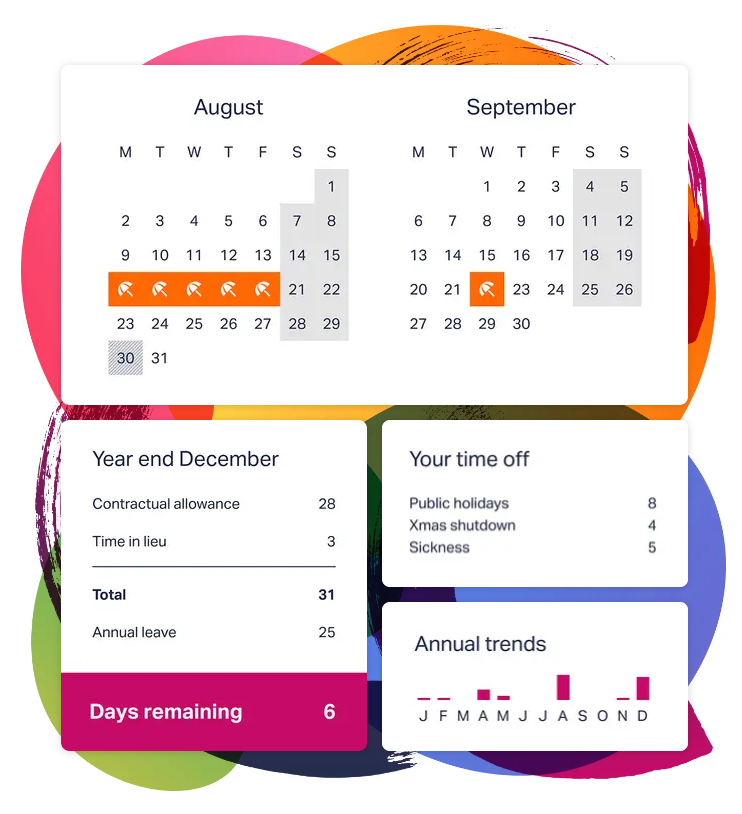
Timetastic is a staff leave management tool used by more than 200,000 people. Everyone gets a personal holiday calendar, and a shared wallchart shows who is out of the office and when so you can plan workloads around availability.
The app handles requests, approvals, and daily or weekly email digests that summarize upcoming absences for the whole team. The Pro plan adds absence trend reporting, company-wide analytics, accrued leave tracking, and single sign-on for larger organizations. Timetastic integrates with Slack, Microsoft Teams, Google Calendar, and Outlook. Its strength is simplicity: most teams get set up in minutes, and employees need almost no training to start booking leave.
Pricing: £1.20 per user per month, or £2 per user per month for Timetastic Pro. 30-day free trial, no credit card required, with a 50% discount for charities.
Best for: Small teams that want a simple, well-liked holiday planner with almost no learning curve.
4. TimeTac
TimeTac is an annual leave system that automatically calculates holiday entitlement and every type of time off. Setup is quick, requests run through configurable approval workflows, and the mobile app lets employees and managers handle leave from anywhere.
A standout feature is substitute-manager routing: if the usual approver is away, requests automatically go to a designated backup so nothing sits unprocessed. TimeTac also handles carryover rules, preloaded public holiday templates for countries worldwide, and Excel or PDF reporting. Data is stored on EU servers with ISO 27001 certification, which matters for organizations that operate under GDPR or other European data protection requirements.
Pricing: A base fee of €19.50 per month plus the Leave Management module at roughly €2.50 per user per month (net). 30-day free trial, with custom rates for accounts above 20 users.
Best for: European teams that want compliance-focused leave management with certified data security, ideally alongside TimeTac’s time tracking module.
5. Deputy
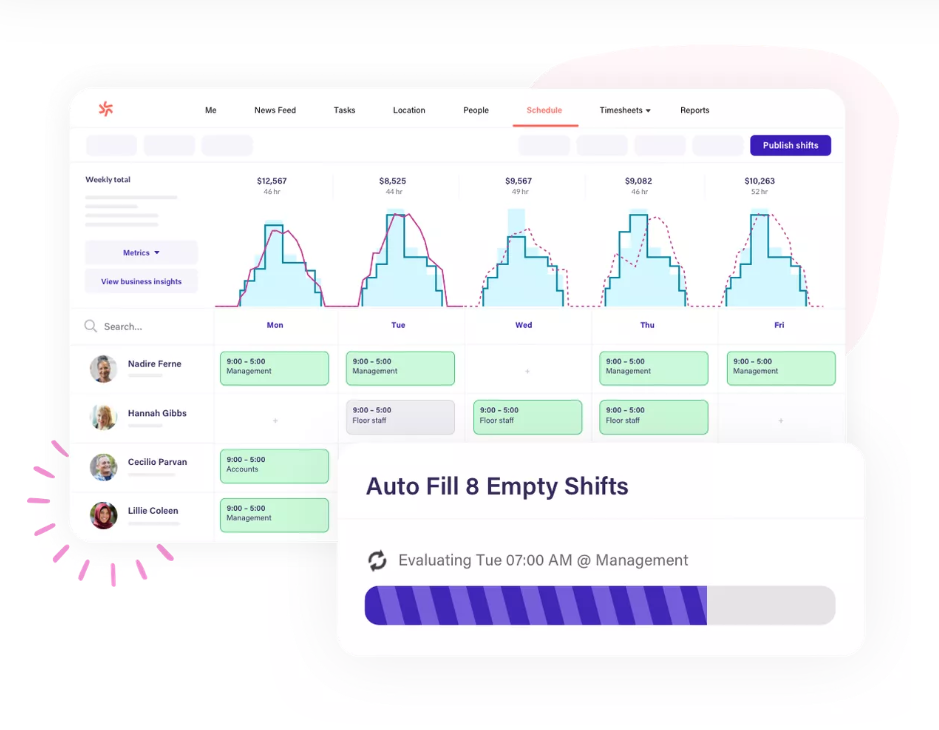
Deputy is a workforce management platform with strong shift scheduling and a built-in leave module. Employees track their own balances and submit time off requests through the app, and managers approve them from any device.
You can set custom accrual rates per leave type, and Deputy automatically blocks leave requests for dates you have marked as all-hands-on-deck. Because scheduling and leave live in the same system, the roster always reflects who is actually available. You stop building shift rosters around someone who is actually on approved leave in a different tool.
Pricing: Lite is $5 per user per month and includes leave and availability management. Core is $6.50 and Pro is $9. A $30 per month minimum applies, with a free trial of up to 31 days.
Best for: Shift-based businesses in retail, hospitality, and healthcare that need scheduling and leave in one tool.
6. Myhrtoolkit
Myhrtoolkit is a UK HR platform with a solid holiday and absence module. It automates pro-rata annual leave calculations for full-time, part-time, and variable-hours staff, so approving or rejecting requests takes a couple of clicks and balances stay accurate without manual spreadsheet adjustments.
Employees use self-service to request leave and check their own balances without going through HR. The tool integrates with Outlook and Google Calendar so approved absences appear on personal and shared calendars automatically. Its absence management module adds Bradford factor tracking and self-certification, both of which help HR teams spot patterns in short-term absence before they become larger problems.
Pricing: A flat monthly fee banded by headcount, starting at £22 per month for up to 5 employees and £37.50 for 6 to 10, scaling from there (excluding VAT). Registered charities get 10% off.
Best for: UK small and medium-sized businesses that want affordable HR plus leave management in one place.
7. Kenjo
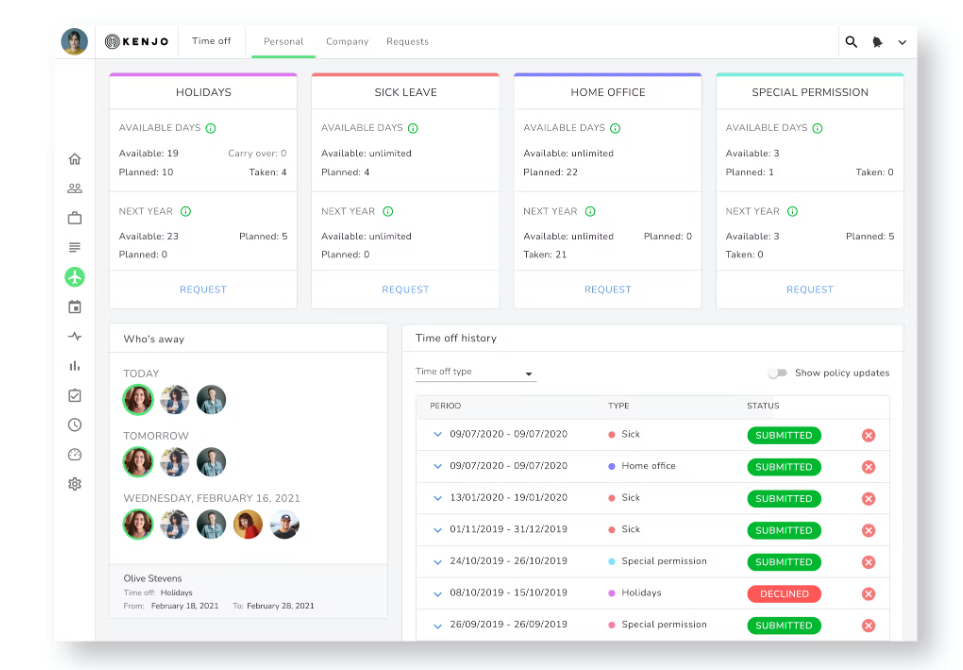
Kenjo is a German HR platform that covers time off, sick leave, and shift planning alongside its wider people management features. It keeps track of annual entitlements and automatically recognizes regional and national holidays so those days are not deducted from personal allowances.
Employees request time off in a few clicks and see their remaining balance at a glance. Approved leave syncs to personal calendars and to Slack, and managers get clear reports to analyze absence trends across departments. Kenjo also handles recruiting, onboarding, and performance reviews, so it works for companies that would rather have one HR login instead of five separate tools.
Pricing: Starter is €6 per employee per month (€5.40 billed annually), Growth is €10, and Connect is quote-based. Optional recruiting add-ons are priced separately.
Best for: European small and medium-sized businesses that prefer one HR platform over a standalone leave tool.
8. LeaveWizard
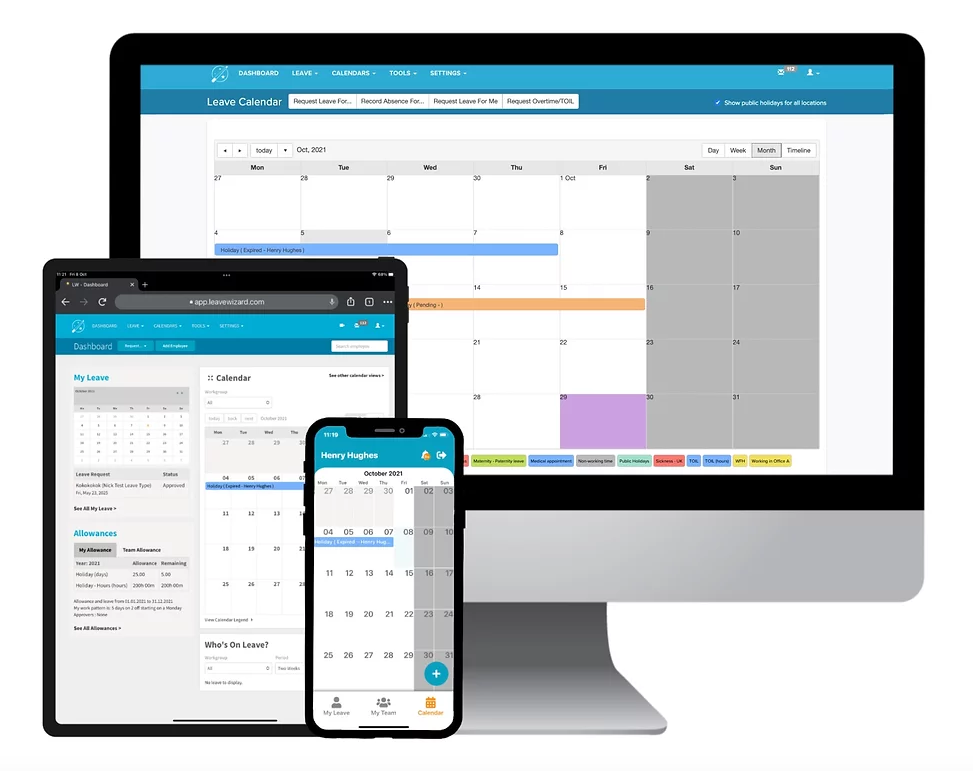
LeaveWizard is a leave and absence tool for small businesses that have outgrown wallcharts and spreadsheets. It automates leave, overtime, and TOIL tracking, and gives managers a live view of team availability so coverage gaps are visible before they cause problems.
You can build custom leave policies with accruals and carryover, keep sickness records private while holiday bookings stay visible to the wider team, and let employees self-serve through the mobile app. LeaveWizard integrates with Google and Outlook calendars, Google Workspace, Slack, and Microsoft Teams. UK employers will appreciate the privacy controls around sickness data, since employment law requires that health-related absences are handled with more care than standard holiday bookings.
Pricing: From £0.43 per employee per month, billed annually and scaled by headcount. 30-day free trial with no card required.
Best for: Growing SMEs that need more than a holiday calendar but less than a full corporate HR suite.
9. BrightHR
BrightHR is a UK HR platform trusted by more than 120,000 businesses, with a staff holiday planner at its core. It calculates annual leave automatically, flags holiday clashes so you avoid being understaffed, and lets managers approve or decline requests through the BrightHR app.
Beyond leave, BrightHR bundles shift scheduling and rotas, sickness and lateness tracking, document storage, and clocking in. It also offers optional 24/7 employment-law advice from in-house specialists, which gives smaller businesses access to legal guidance they might not otherwise have. The result is more of a people-management suite than a single-purpose leave tool.
Pricing: Package-based and typically quoted for your business size. Online packages start at around £16.67 per employee per month for small teams and fall to approximately £3 per employee per month at larger headcounts.
Best for: UK businesses that want HR software plus built-in employment-law and health and safety support.
10. ClayHR
ClayHR (formerly BizMerlinHR) is a configurable HR platform used in more than 160 countries. Its leave module includes a shared absence calendar, employee self-service, flexible time off rules, reporting, and a mobile app, so you can manage everything from single days off to extended leaves of absence.
Leave management sits inside a full HRMS with talent acquisition, performance reviews, timesheets, and expense tracking. If your goal is to run most of HR from one login instead of four or five separate tools, ClayHR is built for that. It also handles region-specific leave policies across multiple countries, which matters for companies with people in more than one jurisdiction.
Pricing: The Professional plan starts at $7 per employee per month and includes PTO, timesheets, and employee records. Enterprise is $9 per employee per month, and Enterprise++ is quote-based.
Best for: Growing companies that want a configurable, full HRMS with leave management built in.
How to choose the right system
Most of the decision comes down to how big your team is, what other tools you use, and what you want to spend.
Team size sets how much configurability you need. A team of 15 can get by with a simple planner like Timetastic or WhosOff. A team of 200 across multiple locations needs per-location policies, role-based visibility, and robust reporting, which is where actiPLANS, TimeTac, or a full HR suite like ClayHR fits better.
Integration needs narrow the field fast. If your team lives in Slack or Microsoft Teams, WhosOff, Timetastic, Kenjo, and LeaveWizard connect there directly. If you run shifts, Deputy keeps scheduling and leave together. If you already use actiTIME for time tracking, actiPLANS connects the two into a single stack.
Dedicated tool vs. HR suite. If leave management is your only gap, a standalone tracker like actiPLANS, Timetastic, or WhosOff will be simpler to set up and cheaper per user. If you also need onboarding, performance reviews, or payroll, a platform like Kenjo, BrightHR, or ClayHR covers more ground from one login.
Budget sets the floor. Most tools here are trial-only, so watch for the difference between a free trial and a genuinely free plan. actiPLANS is the only option on this list with a permanent free plan (up to 3 users), and its paid plans start at $1.50 per user per month, which keeps costs low even at mid-size scale.
If you are not sure where to start, actiPLANS offers a 30-day free trial with full access to every feature. Set up your leave types, configure your approval workflow, and run your first report before committing to anything.
FAQ
What is the best software for tracking leave?
actiPLANS is the strongest dedicated option for most teams: it automates accrual and approvals, handles multiple locations and unlimited leave types, and starts free for up to 3 users. If you run shift-based teams, Deputy keeps scheduling and leave in one place. If you want leave as part of a broader HR platform, BrightHR, Kenjo, and ClayHR all include leave management alongside other HR functions.
What is the best software for tracking PTO?
For dedicated PTO tracking, actiPLANS and Timetastic are the strongest options. actiPLANS handles complex accrual rules and supports unlimited custom leave types. Timetastic is simpler and suits small teams that want fast setup. If you also need payroll or performance management, a larger platform like Deputy or ClayHR may cover PTO alongside other workforce management tasks.
Is there a free staff leave app available?
Yes, but genuinely free plans are rare. Among the tools reviewed here, actiPLANS offers a permanent free plan for teams of up to 3 users. Most other tools provide a free trial (typically 30 days, up to 8 weeks for WhosOff) rather than a free plan, so you pay once the trial ends. A free plan works well for very small teams. If you have more than a few employees, expect to pay between £0.43 and $7 per person per month depending on the tool and feature set.
How can I track annual leave in Excel?
You can track annual leave in Excel by creating a spreadsheet with columns for employee name, leave type, start date, end date, and remaining balance, then updating it manually each time someone takes time off. This works for very small teams, but it breaks down quickly: there is no approval workflow, no overlap detection, no automated accrual calculations, and no way to prevent errors when multiple people edit the file at the same time. Dedicated annual leave management software handles all of these automatically and typically costs under $2 per user per month.
What is the difference between annual leave software and full HR software?
Annual leave software does one job: handle time off requests, approvals, balances, and reporting. HR platforms like BrightHR, Kenjo, and ClayHR include leave as one module alongside payroll, onboarding, and performance management. If leave is your only gap, a dedicated tool is simpler and cheaper. If you are already buying an HR platform for other reasons, using its built-in leave module saves you from running two systems.
How much does annual leave management software cost?
Pricing ranges from free (actiPLANS for up to 3 users) to around €6 to $9 per employee per month for full HR platforms. Most dedicated annual leave tools fall between £0.43 and $1.50 per user per month. Some tools charge a base fee plus a per-user cost, while others use banded pricing that scales with headcount. Always check whether the listed price is for annual or monthly billing, as annual plans are typically 15% to 20% cheaper.