A well-organized leave management process does more than keep things tidy. It helps prevent burnout, keeps your team productive, and removes the guesswork from payroll.
When leave requests fall through the cracks, the consequences add up: payroll errors, unhappy employees, and potential legal trouble.
That is why it matters to set up a clear leave management process where nothing gets lost and everyone knows what to do.
actiPLANS helps with all of this:
- It allows employees to submit leave requests in a few clicks,
- Promptly notifies managers when somebody asks for time off,
- And provides them with all the data needed for a quick response.
Below, we will walk through how actiPLANS handles leave management and what that looks like in practice.
What Is a Leave Request?
A leave request is a formal request to take time off from work. This can be for a full or partial day, or for an extended period such as vacation.
A typical leave request contains the following information:
- The date(s) of expected absence
- An explanation of why an employee needs time off (e.g., family emergency, doctor’s appointment, etc.)
- Whether the leave is paid or unpaid
- The employee’s contact information
- Any other relevant information that the company requires
- A supervisor’s approval signature and notes
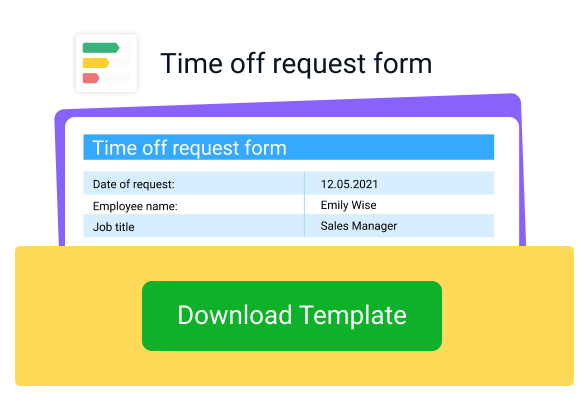
Leave requests can be made in writing or using any digital or online tool of choice. And in case you prefer to manage your team’s leave requests via simple electronic documents, we have a lovely leave request template for you!
Ask your employees to fill it out before sending their leave requests your way via email or any other communication platform adopted in your company. Then, quickly review and approve or reject the submitted leave request and forward it back to the sender.
Simple!
To download our leave requests template for free, just click the button below.
Types of Leave Requests
Not every leave request is the same, and a good leave request management process treats them differently. The most common types include:
- Vacation or PTO. Planned time off for rest or personal reasons, usually requested in advance and drawn from an accrued balance.
- Sick leave. Time off for illness or medical appointments, often requested with little or no notice.
- Personal leave. Time off for personal matters that do not fall under vacation or sick leave, such as moving house or handling a family emergency.
- Parental and family leave. Leave for the birth or adoption of a child, or to care for a family member, which may be partly covered by laws like the FMLA (more on that below).
- Bereavement leave. Time off following the death of a family member or close friend.
- Jury duty and military leave. Time off required by law for civic or military service.
- Unpaid leave. Time off that goes beyond an employee’s paid balance or applies to employees who have not yet accrued paid leave.
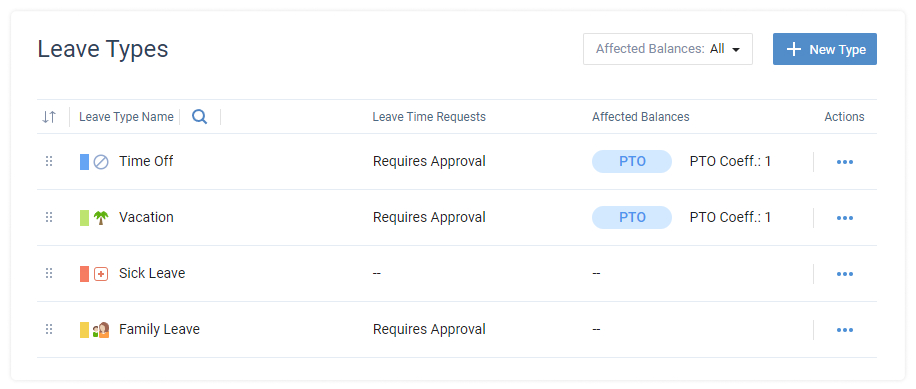
actiPLANS lets you create unlimited custom leave types so each of these categories can have its own accrual rules, approval settings, and reporting instead of being lumped into one generic “time off” bucket.
What Is Leave Request Management?
The leave request management process comprises four basic steps:
- An employee plans their time off and submits a request, usually through an official form, formal email or another standard method of choice.
- A manager reviews the request. Before deciding to approve or decline it, they often check the employee’s time off history, workforce capacity for the selected leave period, team workloads, and so on.
- The manager notifies the employee about the final leave request status, which can be done via email, chat or in person.
- The manager logs all the changes in employee PTO balance to keep an accurate track of payroll data and make certain neither the business nor its team members lose their well-earned money.
That four-step process sounds simple enough. But once your team grows beyond a handful of people, a decentralized process run on paper or in email starts breaking down fast.
Moving everything into a single platform removes the bottlenecks and cuts down on mistakes.
And that’s what makes actiPLANS your best choice here.
Main Benefits of Using actiPLANS for Leave Management
- Convenience of use – Employees can see their PTO balance, check how it was accrued, and submit leave requests in seconds. When people can answer their own questions about time off without emailing HR, it saves everyone time and builds trust.
- Higher efficiency – You can set up auto-approval for certain leave types, and actiPLANS calculates PTO balances automatically. No manual math.
- Faster manager response – Even if you don’t automate approvals, actiPLANS still speeds up the process with instant notifications about new leave requests and a one-click approval feature.
- Informed decision-making – All absence records live in one place. When you need to review your team’s time off patterns, you can pull a report filtered by date, team, or leave type.
- Access from any device – Employees can submit leave requests and check their PTO balance from the actiPLANS mobile app on iOS or Android, not just from a desktop browser. Managers get notified and can approve requests on the go.
Leave Request Management and Legal Compliance
Handling leave requests poorly does not just hurt productivity. It can create real legal exposure. In the US, the Family and Medical Leave Act (FMLA) requires employers with 50 or more employees within a 75 mile radius to provide up to 12 weeks of unpaid, job protected leave to employees who have worked at least 12 months and 1,250 hours, for reasons such as a serious health condition or the birth or adoption of a child.
On top of federal rules, more than 20 US states and a number of cities now mandate paid sick leave, and the accrual rates, usage caps, and eligibility rules differ by location. A leave request management process that treats every location the same risks noncompliance, so if your team spans multiple states, check the current requirements for each one rather than assuming a single policy covers everyone.
This is where having leave types, approval rules, and balance history in one system helps: actiPLANS lets you set up separate leave types and accrual rules per policy, and keeps a full history of every balance change, so you have accurate records if a leave request is ever questioned.
Managing Leave Time with actiPLANS
What does it take to get leave request management running well in actiPLANS?
Start by setting your own PTO accrual rules and creating all the leave types you want to track. Accrual usually works one of two ways: employees earn leave incrementally over time (for example, a set number of hours per pay period), or they get their full annual balance upfront, sometimes with a cap on how much unused leave carries over to the next year. Check out this post for more on how to set that up, and read the steps below for what to do next.
How to request a leave of absence
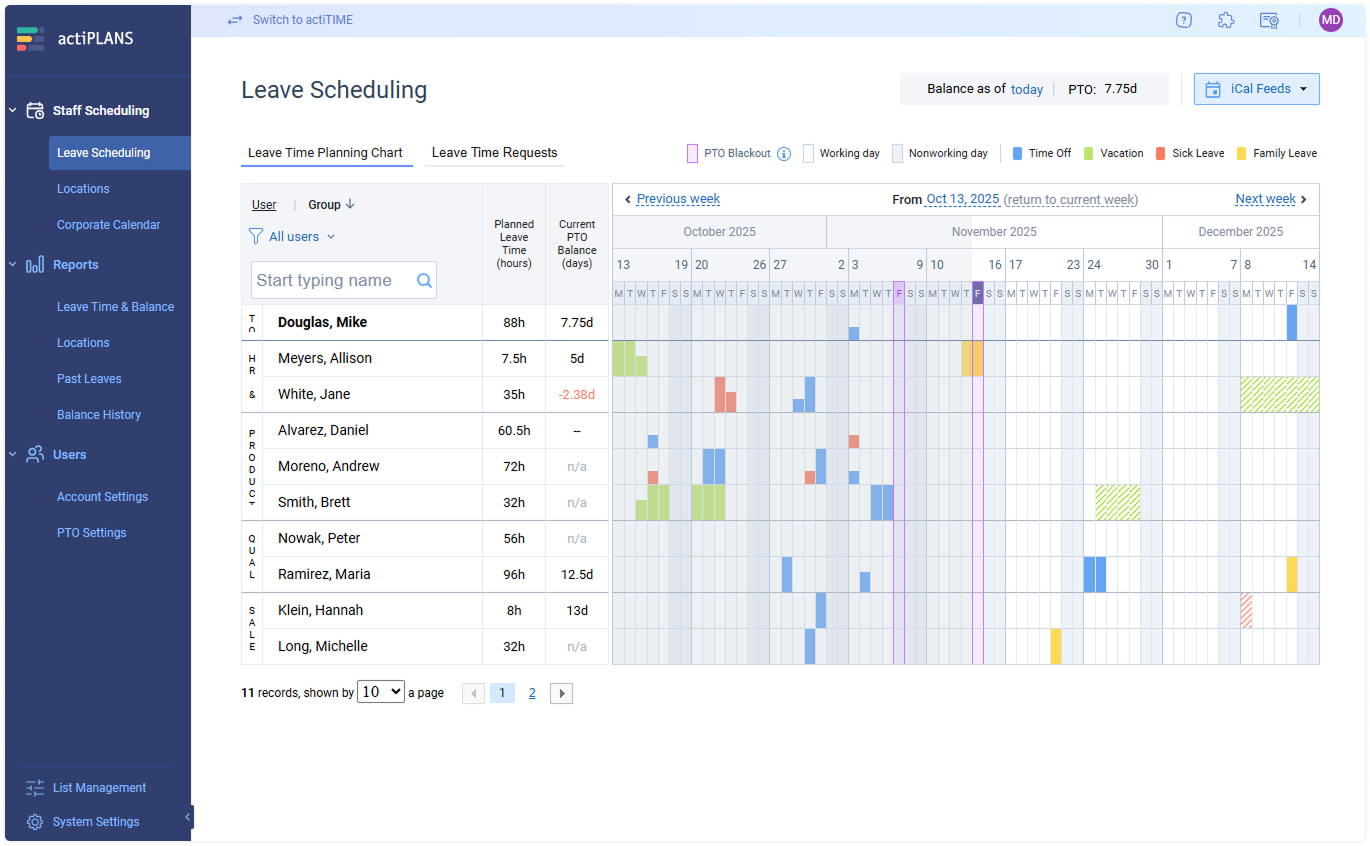
The Leave Scheduling interface is where employees plan days off and submit leave requests. It shows how many days off you had, have, or will have on your PTO balance throughout the employment period.
You can view this info either on a small display at the upper corner of the calendar or by hovering over any date on the My Leave Time Requests timeline with the mouse cursor:
It takes only four simple steps to submit a leave request via My Leave Time Requests:
- Select preferable dates on the timeline to open the leave request form,
- Make sure you have enough PTO on your balance for the chosen dates,
- Indicate which type of leave you want to take,
- Add a comment for your manager if you want to clarify some points.
After you hit the Submit Request button, your manager will be immediately notified about a new incoming leave request via email. And whenever your leave request gets approved or rejected, you will be alerted at once as well.
Another way to tell the status of your leave request is by the coloring: pending leave requests are highlighted in the hatch pattern, while the approved ones take on a solid color.
How to approve leave requests
To approve or decline leave requests in actiPLANS, you need to do the following:
1. Assign manager permissions
Decide who should be responsible for time off request approval in your team and grant them the Manage Leave Time Requests permission. It authorizes managers to access other users’ PTO data and process it in the system. You can also assign different approvers per leave type, so, for example, sick leave and vacation requests can route to different people.
2. Configure auto-approval and scheduling rules
Would you like some types of time off to be processed automatically? You can play around with leave type settings and create some time off categories that won’t require manager approval at all. Plus, you can choose to auto-approve or auto-reject leave requests upon their starting dates, which will help you make sure no leave request remains unprocessed by the due period even if an assigned manager somehow neglects it.
actiPLANS also gives you tools to prevent scheduling conflicts before they happen. You can set PTO blackout dates for your busiest periods when you need the full team available, and the system flags overlapping leave requests so you can see right away if too many people on the same team are trying to take the same days off.
3. Check on pending leave requests
Your employees’ leave requests are available for review in an easy-to-read list.
It has a flexible configuration and allows you to do the following things:
- Filter leave requests by users, leave types, related time off balances and current statuses
- Sort them in multiple ways (by periods, user groups, etc.)
- Approve, reject or delete leave requests in a few clicks, both in bulk and individually
- Edit time off requests
- Attach comments to approved and rejected requests in case you need to clarify something for employees
4. Run reports to analyze absenteeism trends
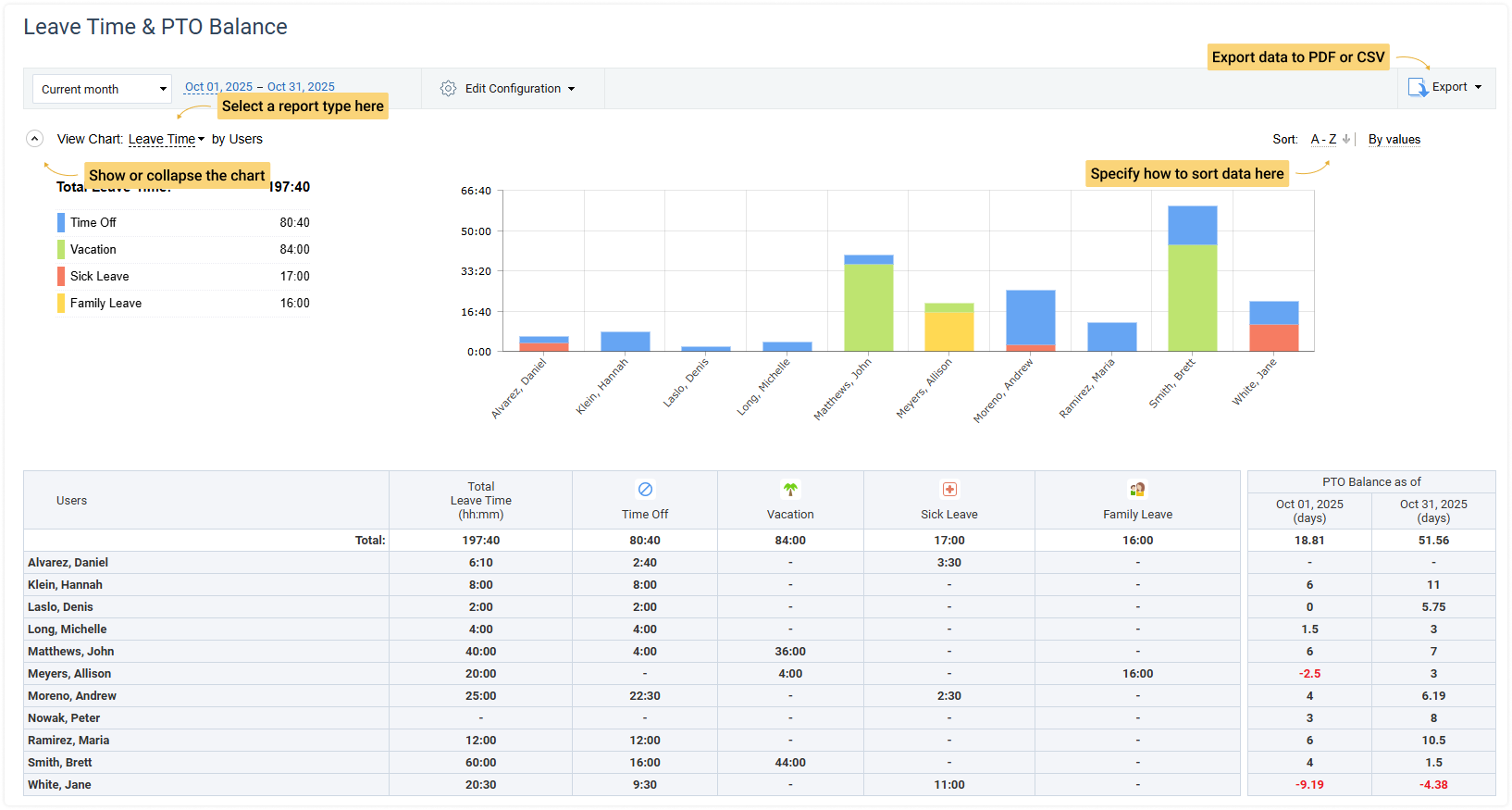
actiPLANS reports show how much time off your team members have taken over any period and which leave types came up most. You can spot who might be overworking (and heading toward burnout) or who is absent more often than expected. That data makes it easier to decide on future requests and address patterns early.
You can export all report data as CSV or PDF, which makes it easy to hand off leave records to payroll or share absence summaries with leadership.
FAQ
What is an example of a leave request?
A simple leave request looks like this: “I would like to request vacation leave from August 18 to August 22. I have 6 days available on my PTO balance and will hand off my open tasks to [colleague] before I leave. Please let me know if you need anything else to approve this.” A good leave request states the dates, the leave type, and confirms the employee has checked their balance.
What is the best leave management system?
The best leave management system is the one that matches how your team actually works: it should let you create leave types that reflect your real policies, notify managers immediately, keep an accurate balance history, and give employees self-service access to their own data. actiPLANS covers all of this in one interface, with approval rules and reporting built in per leave type, rather than requiring separate tools for tracking, approving, and reporting on leave.
How do you manage annual leave requests?
Annual leave (vacation) requests are easier to manage when they are planned ahead of time rather than approved one by one as they arrive. Set clear PTO accrual rules so employees can see their available balance before requesting, use blackout dates or capacity limits for your busiest periods, and review upcoming requests on a shared team calendar so overlapping absences are visible before you approve them, not after.
Conclusion
When leave request management works well, employees are happier, compliance is easier to maintain, and the business spends less time on admin.
actiPLANS handles the automation, gives employees self-service access to their own data, and takes minutes to set up rather than days. You can integrate it into your workflows without spending hours learning how to use it.
If your team also tracks billable hours or project time, actiPLANS integrates with actiTIME so leave data and time tracking live in the same system, with no double entry.
Start a free trial to see how it works with your team.